Stand out in job applications: practical tactics for jobseekers

Four actions separate the applications that get interviews from the ones that don’t: tailor every CV to the specific advert, quantify your impact in achievement bullets, make your CV scannable and ATS-safe, and send one short personalised outreach message before or after applying. Recruiters spend an average of around seven seconds scanning a CV, so the top third of your document carries most of the weight. Applicant Tracking Systems (ATS) filter applications before a human ever sees them, which means a beautifully written CV can be invisible if it uses the wrong format. For UK security roles specifically, Securityjobsboard is a specialist platform where you can upload your CV, set role alerts, and apply directly to vetted vacancies.
Before you send, run through this checklist:
- Tailor the top third of your CV to mirror the job advert’s language
- Replace at least two duty-only bullets with achievement statements that include a number or outcome
- Save as a .docx or plain PDF; never embed contact details in a header
- Write one two-line outreach message to the recruiter or hiring manager on LinkedIn
- Read the whole application aloud once to catch errors
Key takeaways
Tailoring your CV to each advert, quantifying your impact, and keeping your formatting ATS-safe are the three highest-return actions you can take before any application goes out.
| Point | Details |
|---|---|
| Tailor the top third | Rewrite your summary and top bullets to mirror the job advert’s language for every application. |
| Quantify your impact | Replace duty-only bullets with context-action-outcome statements; use estimates when exact figures are unavailable. |
| Pass the 7-second scan | Recruiters skim for job title, employer, and one achievement in around seven seconds — make all three visible immediately. |
| Keep formatting ATS-safe | Use a single-column layout, standard headings, and save as .docx or plain PDF; paste into plain text to verify. |
| Track and iterate | Log which templates convert to interviews and adjust one variable at a time to improve your conversion rate. |
Table of Contents
- What should you do before sending any application?
- How do you tailor your CV to a specific job advert?
- Does the 7-second rule really apply to your CV?
- How do you use keywords without sounding like a robot?
- How do you turn job duties into achievement statements?
- How should you use LinkedIn to support your application?
- How do you write a cover note that actually gets read?
- What are the red flags that get CVs rejected quickly?
- When should you use a creative CV format?
- When and how should you follow up after applying?
- How should you use AI tools when writing your application?
- How do you tailor applications for UK security roles?
- What makes a cover letter genuinely complement the CV?
- What do standout CV and cover letter templates look like?
- How do you highlight transferable skills when changing careers or explaining gaps?
- How can your social media profiles support your application?
- How do you handle online application questions and assessments?
- The honest truth about job applications: treat them as experiments
- Sources
- FAQ
What should you do before sending any application?
Think of this as your five-minute pre-flight check. Run through it every time, even for roles that feel like a safe bet.
File and format Save your CV as a .docx or a plain PDF. Subject line for email applications: “Application: [Job Title] — [Your Name]”. Specific beats clever every time.
Top-third relevance The first half-page should answer the question “why this person for this role?” without the reader scrolling. If your current summary is generic, swap it for one sentence that names the role, your relevant experience, and one outcome.
Two achievement bullets Pick your two strongest results and make sure they follow this pattern: what you did, how you did it, and what changed because of it. Numbers are ideal; percentages, time saved, or scale work just as well.
Outreach micro-templates
2-line LinkedIn connection request: 3-line cover note opener: Subject line examples:
- “Application: Security Operations Manager — Jane Smith”
- “Re: [Job Title] — Relevant experience in [specific skill]”
- “Following up: [Job Title] application, [Your Name]”
Pro Tip: Paste your CV text into Notepad or a plain-text editor before sending. If the layout collapses or symbols appear, your ATS readability is at risk. Fix the formatting before you submit.
How do you tailor your CV to a specific job advert?
Generic applications are easy to spot and easy to reject. Experts consistently find that tailored applications referencing company values and measurable outcomes outperform high-volume generic ones. The process takes around 20 minutes per role and pays back in interview rates.
- Print or copy the job advert. Highlight every skill, qualification, and responsibility listed. Circle the words that appear more than once — those are the role’s priorities.
- Map your experience to those priorities. Note which of your roles or projects directly addresses each highlighted point.
- Rewrite your CV summary. Name the role, name the employer if relevant, and reference one specific outcome. Keep it to three sentences.
- Move the most relevant experience to the top third. If a role from four years ago is more relevant than your current one, lead with a “Relevant Experience” section.
- Mirror the advert’s language honestly. If the advert says “stakeholder management”, use that phrase — not “client liaison” — provided it accurately describes what you did.
- Adjust your cover note last. One sentence on why this company, one on your strongest relevant result, one call to action.
Before/after example:
| Version | Text |
|---|---|
| Generic | “Responsible for managing a team and ensuring targets were met.” |
| Tailored | “Led a six-person patrol team across three retail sites, reducing incident response times by 30% over six months.” |
For similar roles, you may only need to update the summary and two or three bullets. For a different sector or seniority level, rework the top third entirely and review every bullet for relevance.
Does the 7-second rule really apply to your CV?
Yes, and it shapes everything about how your CV should be structured. Recruiters decide in around seven seconds whether a CV is worth reading further, scanning for job title, employer name, and a headline achievement. If those three things aren’t visible immediately, the CV goes in the ‘no’ pile before the recruiter reaches your strongest experience.
| Metric | Guidance |
|---|---|
| Average recruiter skim time | ~7 seconds |
| Recommended UK CV length | 1–2 pages |
| Preferred export format | .docx or plain PDF |
| Layout | Single-column, standard fonts |
| Contact details | In body text, not in header/footer |
Formatting rules that protect ATS readability:
- Use standard section headings: “Work Experience”, “Education”, “Skills”
- Avoid tables, text boxes, and columns — ATS parsers often scramble them
- Use a standard font (Calibri, Arial, or Georgia at 10–12pt)
- Keep margins at 1.5–2.5cm
- No photos, logos, or graphics unless you are applying for a creative role
UK CVs run to one page for early-career candidates and two pages for those with five or more years of experience. A third page is rarely justified and often signals poor editing rather than impressive depth.
How do you use keywords without sounding like a robot?
ATS filters work by matching your CV text against the job advert’s language. The fix is not to stuff keywords into every sentence — it is to extract the role’s core vocabulary and place it where it reads naturally.
Extracting keywords: Copy the job advert into a word-frequency tool or simply read it twice and note the terms that appear repeatedly. Look for: role-specific skills, software names, qualifications, and sector terms. Cross-reference two or three similar adverts to find the consistent vocabulary.
Where to place them:
- Skills section (a short, scannable list near the top)
- First bullet of each relevant role
- LinkedIn headline and “About” section
Pro Tip: After adding keywords, read each bullet aloud. If it sounds like a list of search terms rather than something a person did, rewrite it as a sentence: “Managed access control systems across four sites” beats “Access control, CCTV, site management, patrol.”
Harvey Nash advises making CVs AI-readable while using AI to refine rather than replace personal content — the same principle applies to keyword placement. The goal is a CV that passes the filter and then convinces the human reader.
How do you turn job duties into achievement statements?
Most CVs describe what a role involved. The ones that get interviews describe what changed because the person was in the role. Recruiters value candidates who connect delivery to commercial outcomes — revenue, cost savings, time saved, or scale.
The formula: Context + Action + Outcome + Metric (where available)
Before/after examples:
-
✗ “Responsible for patrolling the premises.”
-
✓ “Conducted hourly patrols across a 12-acre retail site, contributing to a 40% reduction in theft incidents over one quarter.”
-
✗ “Managed CCTV systems.”
-
✓ “Monitored 48 CCTV cameras across two sites and identified three security breaches that led to successful prosecutions.”
-
✗ “Trained new staff.”
-
✓ “Delivered induction training to 15 new officers over six months, cutting onboarding time from three weeks to ten days.”
When you don’t have precise numbers, use proxies: “approximately”, “up to”, “across X sites”, “serving Y clients”. A credible estimate beats a vague duty every time.
Five-minute exercise: Pick your top role. Write down three things you did regularly. For each one, ask: How many? How often? What improved? What would have happened without me? Write one sentence per answer. Those are your achievement bullets.
How should you use LinkedIn to support your application?
LinkedIn is not just a digital CV — it is a search engine that recruiters use actively. Targeted outreach and a personalised connection message can raise your visibility with hiring teams significantly, particularly when you reach out before or shortly after applying.
Fields to optimise for recruiter search:
- Headline: Job title + key skill + sector (e.g., “Security Operations Manager | CCTV & Access Control | London”)
- About section: Three to four sentences mirroring the language of roles you are targeting
- Skills: Add the top ten skills from your target job adverts; ask connections to endorse the most relevant ones
- Experience bullets: Mirror your tailored CV — same keywords, same achievement framing
Outreach workflow:
Who to contact: The recruiter named in the advert, the hiring manager if visible, or a team member in a similar role.
When: Within 24 hours of applying, or up to two days before if you want to build familiarity first.
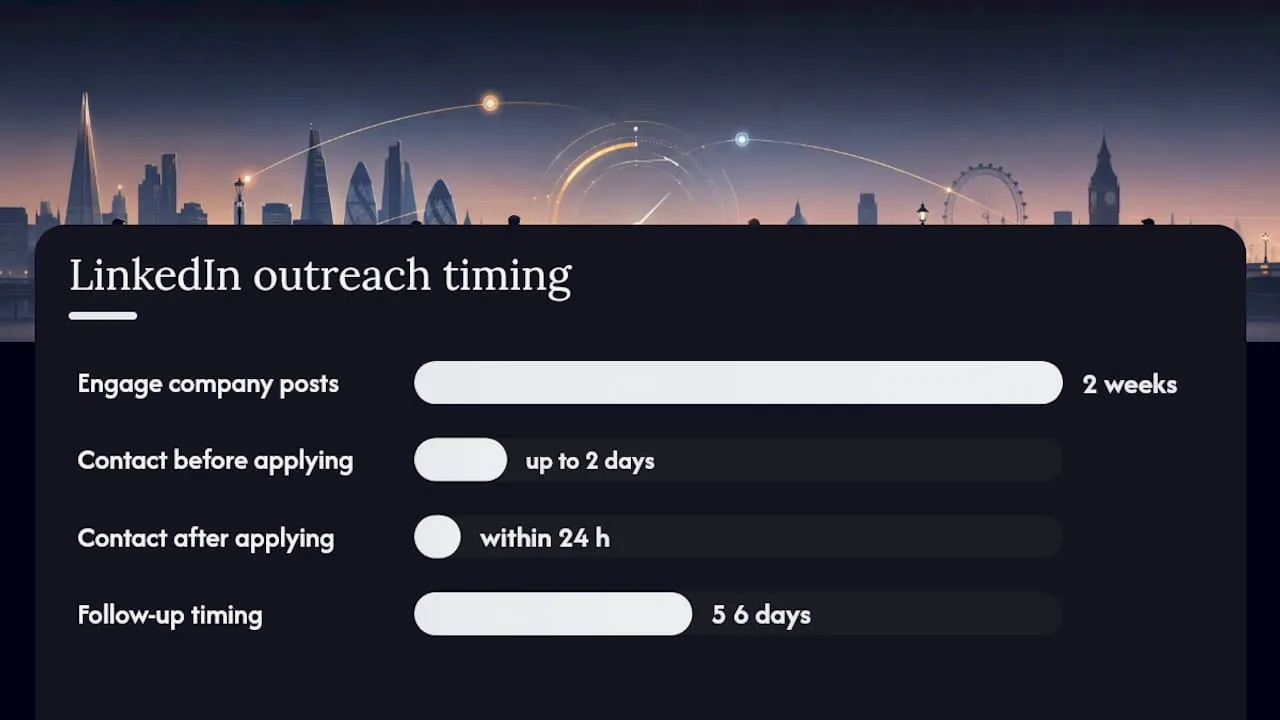
2-line connection request: 3-line follow-up (sent 5–7 days after connecting): Pro Tip: Engage with the company’s LinkedIn posts in the two weeks before applying. A genuine comment on a relevant post puts your name in front of the team before your application arrives.
Dos and don’ts:
- Do personalise every message — copy-paste DMs are immediately obvious
- Do build connections before you need them, not only when actively applying
- Don’t send the same message to ten people at the same company
- Don’t follow up more than twice without a response
How do you write a cover note that actually gets read?
Most cover notes fail because they repeat the CV. A strong cover note does one thing the CV cannot: it explains why this role, at this company, right now. Keep it to three or four sentences.
Structure:
- One sentence: the role and why you fit it specifically
- One sentence: your strongest relevant achievement
- One sentence: what you bring that connects to the company’s goals
- One sentence: a clear, low-pressure call to action
Three templates by seniority:
Early career: Mid-level: Senior: Pro Tip: UK hiring managers generally prefer a cover note that is under 250 words. If you have a relevant portfolio, case study, or accreditation document, mention it in the final line and attach it separately — never embed it in the CV itself.
What are the red flags that get CVs rejected quickly?
Common recruiter red flags include spelling errors, unexplained gaps, duty-only bullets, and formatting that breaks in ATS. Most of these take under an afternoon to fix.
Red flags and their fixes:
- Spelling and grammar errors: Read aloud, then use Grammarly or Microsoft Editor as a second pass. One typo in a cover note can end an application.
- Unexplained employment gaps: Add a one-line note in the relevant date range: “Career break: full-time carer” or “Freelance security consultancy, 2023–2024.” Silence reads as evasion.
- Duty-only bullets: Every bullet that starts with “Responsible for” is a missed opportunity. Convert at least three to achievement statements using the formula above.
- Generic summary: “A motivated and hardworking individual seeking a challenging role” tells a recruiter nothing. Replace with a three-sentence summary that names your sector, your strongest skill, and one outcome.
- Inconsistent dates: Check every date range. Overlapping dates or missing years suggest carelessness or something to hide.
- ATS-breaking formatting: Remove text boxes, tables within tables, headers and footers containing contact details, and any image files. Paste into plain text to confirm the structure survives.
- Wrong length: A five-page CV for a junior role signals poor judgement. A one-page CV for a senior role signals incomplete experience. Match length to seniority.
Proofreading workflow: Read aloud once. Paste into plain text. Ask someone else to read it cold. Three steps, 30 minutes, and the most common rejection triggers are gone.
When should you use a creative CV format?
For most roles, a clean, single-column CV in a standard font is the right call. Hiring managers confirm that creative formats help in creative roles but usually harm ATS-readability for non-design vacancies. The rule is simple: match the format to the role’s expectations.
When creative design pays off:
- Graphic design, UX, branding, or marketing roles where visual judgement is part of the job
- Roles where the advert itself uses design-forward language or asks for a portfolio
- Applications sent directly to a named person (bypassing ATS entirely)
Portfolio best practice:
- Curate: five to eight strong pieces beat twenty average ones
- Add context to each piece: the brief, your role, the outcome
- Host on a clean, fast-loading platform (Behance, a personal site, or a Google Drive folder with view-only access)
- Link in your CV and cover note; never embed images in the CV file itself
Acceptable design signals for non-creative roles:
- A subtle colour accent on section headings (one colour, not three)
- Bold job titles with consistent spacing
- A clean skills bar or icon-free skills list
For security, logistics, facilities, and most professional services roles, stick to the plain format. The content is what differentiates you, not the colour scheme.
When and how should you follow up after applying?
Following up shows initiative. Doing it badly shows poor judgement. The difference is timing and brevity.
Timing guidance:
- Online application with no contact: follow up after seven to ten working days
- Application via referral: follow up within three to five working days
- Post-interview: follow up within 24 hours with a short thank-you note
Two templates:
Short check-in (email or LinkedIn): Value-add follow-up (if you have a relevant update): Pro Tip: Keep a simple spreadsheet: role, employer, date applied, date followed up, outcome. When you’re applying to multiple roles, this prevents double-messaging the same recruiter and helps you spot which templates are converting to interviews.
Follow up twice at most. If there is no response after the second message, move on. Persistence beyond that point shifts from professional to off-putting.
How should you use AI tools when writing your application?
AI tools can sharpen your writing. They cannot replace your judgement, your specific experience, or your voice. Hiring managers advise using AI to sharpen thinking rather than outsource it — and that distinction matters in practice.
A practical workflow:
- Draft your CV bullets and cover note in your own words first
- Paste into ChatGPT, Claude, or Grammarly and ask it to tighten the language or flag weak phrasing
- Read the output critically: restore your specific examples, your actual metrics, and your natural voice
- Never accept an AI-generated metric you cannot verify — if the tool invents a number, delete it
What AI does well: catching passive voice, suggesting stronger verbs, flagging vague phrases, and checking keyword coverage against a job advert.
What AI does badly: knowing what you actually did, understanding the nuance of your sector, and writing in a way that sounds like a specific person rather than a template.
Pro Tip: Paste the job advert into an AI tool and ask it to list the top ten keywords and skills the employer is prioritising. Use that list as a checklist when reviewing your CV — then weave the relevant terms into your own achievement statements rather than copying AI-generated sentences.
Follow any instruction in the job advert about AI use. Some employers ask candidates not to use AI for written assessments; ignoring that instruction is an immediate red flag.
How do you tailor applications for UK security roles?
Security employers look for specific signals that most generic CV guides overlook. Licensing status, vetting history, shift flexibility, and client-facing reliability are the priorities — not just years of experience.
What to highlight in your CV and cover note:
- SIA licence: State the licence type (Door Supervisor, Security Guard, CCTV Operator) and expiry date in your contact section or skills summary — recruiters check this first
- Vetting and clearance: Note any BS 7858 vetting, DBS check level, or security clearance; include the issuing body and date where possible
- Shift patterns: Confirm availability for nights, weekends, and bank holidays explicitly if the role requires it
- Incident handling: Include one specific example of an incident you managed, the action you took, and the outcome
- Client-facing reliability: Quantify tenure at sites (“18 months at a single retail site with zero client complaints”) to demonstrate dependability
- Relevant training: First aid, conflict management, fire warden, CCTV operation — list certifications with dates
Understanding the UK security labour market helps you frame your experience against what employers actually need. For a step-by-step application workflow tailored to security roles, Securityjobsboard’s candidate resources cover the process in detail. You can also browse CV search tips used by UK security employers to understand exactly what hiring teams look for when they search the CV database.
What makes a cover letter genuinely complement the CV?
The cover letter’s job is not to summarise the CV — it is to answer the question the CV cannot: why you, why here, why now? That requires a different structure and a different mindset.
Start with the role’s central challenge, not your own background. If the advert mentions rapid expansion, a new client contract, or a specific operational problem, open by naming it and connecting your experience to it directly. That single shift moves your letter from “here is who I am” to “here is what I can solve.”
Keep the evidence tight. One strong, specific achievement in the body of the letter is more persuasive than three vague ones. The CV already lists your history; the letter needs to make one result vivid enough that the reader remembers it.
Close with a low-pressure call to action: “I’d welcome a brief conversation” rather than “I look forward to hearing from you.” The first sounds like a person; the second sounds like a form letter.
For UK employers, brevity signals confidence. A letter that runs to a full page when three paragraphs would do suggests the applicant cannot edit their own thinking — which is itself a signal about how they will communicate on the job.
What do standout CV and cover letter templates look like?
Templates are starting points, not finished products. The most effective ones share three structural features: a summary that names the role and a result, achievement bullets that follow the context-action-outcome formula, and a cover note that opens on the employer’s need rather than the applicant’s history.
CV template structure (UK, two pages):
- Name and contact details (body text, not header): phone, email, LinkedIn URL, location (city only)
- Professional summary (3 sentences): role target + strongest skill + one outcome
- Core skills (8–12 keywords in a clean list): drawn from target job adverts
- Work experience (reverse chronological): employer, job title, dates, then 3–5 achievement bullets per role
- Education and qualifications: institution, qualification, year
- Licences and certifications: SIA, first aid, DBS — with dates
Cover note template (under 250 words):
[Role] at [Company] — [Your Name]
I’m applying for [Job Title] because [specific reason tied to the company or role]. In my current position at [Employer], I [achievement with metric]. I believe [specific skill or experience] maps directly to [company’s stated priority], and I’d welcome a brief conversation to explore that further.
The template only works when every bracketed element is replaced with something real and specific. A template left half-filled is worse than no template at all.
How do you highlight transferable skills when changing careers or explaining gaps?
Career changers and returners often undersell themselves because they focus on what they haven’t done rather than what they have. The reframe is straightforward: identify the underlying skill, not the job title it came from.
A retail manager moving into security brings crowd management, conflict de-escalation, cash handling under pressure, and team supervision. None of those require a security job title to be credible. The key is to name the skill explicitly, give a specific example, and then connect it to the security (or target) role’s requirements.
For employment gaps, the one-line explanation is almost always enough. “Career break: full-time carer, 2022–2024” or “Self-employed, freelance security consultancy, 2023” closes the question before it becomes a concern. What recruiters dislike is silence — not the gap itself.
A functional or hybrid CV format can help career changers by leading with a skills section before the chronological work history. This puts transferable competencies in front of the recruiter before they reach a job title that might not match the role. For most UK employers, a hybrid format (skills summary followed by reverse-chronological experience) is the safer choice over a purely functional CV, which can read as an attempt to obscure history.
How can your social media profiles support your application?
LinkedIn is the primary platform, but it is not the only one. For creative, marketing, or technical roles, a well-maintained GitHub, Behance, or professional Instagram can add weight to an application. The principle across all platforms is the same: your public profile should tell a consistent story that reinforces your CV.
On LinkedIn, the headline is the most-searched field after your name. Update it every time you shift your job-search focus. The “About” section should read like a short professional narrative, not a list of skills — three to four sentences that explain what you do, how you do it, and what you care about professionally.
Recruiters also look at activity. Sharing a relevant article, commenting thoughtfully on an industry post, or publishing a short observation about your sector signals genuine engagement. It is low-effort and puts your name in front of people who are not yet looking at your CV.
One practical check: Google your own name before applying. If the first result is a social media profile with content you would not want a hiring manager to see, adjust the privacy settings. This takes five minutes and removes a risk that many applicants overlook entirely.
How do you handle online application questions and assessments?
Many UK employers now include written questions or psychometric assessments as part of the online application. These are not an afterthought — for some employers, they carry as much weight as the CV.
For written questions (typically “Give an example of a time when…”), use the STAR structure: Situation, Task, Action, Result. Keep each answer to 150–250 words. The most common mistake is spending too many words on the situation and too few on the result. Flip the ratio: one sentence of context, one of the task, two or three on your specific actions, and a clear outcome with a number or observable change.
For psychometric or situational judgement tests, preparation matters more than most candidates expect. Practice tests are widely available online; the goal is not to game the test but to become comfortable with the format so you are not spending cognitive effort on the mechanics during the real thing.
If the advert specifies that a written assessment is part of the process, treat it with the same care as the CV. Spelling errors, vague answers, and copy-pasted responses are as damaging here as on the CV itself. A 30–60–90 day plan is worth preparing for final-stage interviews — it demonstrates how you think about learning and early contribution, and it is one of the most memorable differentiators at that stage.
The honest truth about job applications: treat them as experiments
Most jobseekers treat every application as a one-shot event. The ones who improve fastest treat them as data.
The quality-over-quantity principle is well-established — tailored applications that reference company values and measurable outcomes consistently outperform high-volume generic ones. But “tailor everything” is not enough on its own if you are tailoring the same ineffective template twenty times.
The fix is small experiments. Change one variable at a time: test a different subject line, rewrite the top third of your CV for a specific sector, try a value-add follow-up instead of a plain check-in. Log the outcome. After ten applications, you will have real evidence about what is converting to interviews and what is not — which is more useful than any generic advice, including this article.
The candidates who get interviews quickest are rarely the most qualified. They are the ones who iterate fastest, cut what is not working, and double down on what is. That is a learnable habit, not a talent.
Sources
- BBC article on successful job applications (recruiter tips)
- 5 tips for a successful job application, according to hiring managers and recruiters | British GQ
- 5 ways to make your CV stand out | Harvey Nash
- The Biggest CV Red Flags UK Recruiters Notice (2026) | Shadow CV
- 30-60-90 Day Plan for a Job Interview 2026: Template, Examples and What Hiring Managers Want
FAQ
What is the 7-second rule for CVs?
Recruiters spend around seven seconds scanning a CV before deciding whether to read further, looking for job title, employer name, and a clear achievement near the top. Structuring your CV so those three elements are visible immediately is the single most effective formatting change you can make.
What are the biggest red flags on a UK CV?
The most common recruiter red flags are spelling errors, unexplained employment gaps, duty-only bullets, and formatting that breaks in ATS. Most are fixable in under an afternoon: read aloud, paste into plain text, and replace at least three duty bullets with achievement statements.
What is a 30–60–90 day plan and when should you use one?
A 30–60–90 day plan outlines what you will learn, prioritise, and deliver in your first three months in a role. It is most effective at final-stage interviews, where it demonstrates structured thinking and turns your past experience into a concrete picture of early contribution.
What should you never say when applying for a job?
Avoid vague claims with no evidence (“I am a hardworking team player”), salary demands in a first application unless the advert requests them, and negative comments about previous employers. Generic openers (“I am writing to apply for the role advertised”) waste the recruiter’s attention in the first line — replace them with a specific, relevant statement.
How many times should you follow up after applying?
Follow up twice at most: once after seven to ten working days if you have had no response, and once more if a second relevant development (a new qualification, a relevant project) gives you a genuine reason to reach out. Beyond two messages with no reply, move on.


