Post 2–3 Times a Week: LinkedIn Posts That Win UK Security Roles

Post a short, proof-backed announcement that names the exact role, location and work type you want, includes one concrete result or project, and ends with a low-friction ask such as a comment or DM. Add two or three relevant hashtags, switch Open to Work to recruiter-only if discretion matters, and let LinkedIn’s own recruiter filters do the sourcing. From there, a specialist channel like Security Jobs Board converts that visibility into applications recruiters can actually act on.
TL;DR:
- Posting specific job titles, locations, and work types with a proven achievement increases visibility to relevant recruiters and avoids vague or generic announcements.
- Including a clear, low-friction call to action and using two to three targeted hashtags significantly improves engagement and response rates.
- Optimizing your LinkedIn profile with a tailored headline, concise about section, featured evidence, and relevant skills boosts your chances of appearing in search results.
- Regularly posting two to three times weekly, engaging promptly with comments, and analyzing which formats generate recruiter messages sustains visibility and improves results.
- Complementing LinkedIn activity with a niche job board, like Security Jobs Board, directs recruiter interest into trackable applications, especially when linking or pinning your profile or CV.
Table of Contents
- Pre-publish checklist for every job search post
- Post formats that actually attract recruiters
- Copy-ready “Open to Work” templates
- Profile fixes that make your posts convert
- Building a posting routine that actually sticks
- Mistakes that quietly sabotage your job search posts
- Turning LinkedIn interest into applications on a niche board
- How to tailor posts for different industries or roles
- Leveraging LinkedIn groups and tagging to expand reach
- Examples of successful job search posts
- How to monitor and analyse post performance
- A note on staying consistent when nothing feels like it’s working
- Use Security Jobs Board alongside your LinkedIn activity
- Sources
- FAQ
Pre-publish checklist for every job search post
Before you hit publish, run through this quickly. Recruiters skim fast, and a post missing any of these basics gets scrolled past.
- Role and level named clearly — “Door Supervisor” or “Security Operations Manager”, not “new opportunities”.
- Location and work pattern stated — city or region, plus full-time, part-time, shift-based, or remote where relevant.
- One proof point included — a result, project, qualification, or metric that backs up your claim.
- Open to Work setting matched to your situation — recruiter-only if you’re still employed and need discretion, public if you want maximum reach.
- Two to three hashtags — a function tag, an industry tag, and optionally #OpenToWork.
- Tags kept sparing — mention one or two relevant contacts or organisations only if it genuinely adds context.
- A low-friction ask — “comment below”, “share if you know someone”, or “DM me” rather than a vague appeal.
- A plan for the first hour — decide in advance that you’ll reply to every comment as it lands.
Miss the proof point and the post reads like every other “open to work” update on the platform. Miss the ask and readers have nothing to do with their interest, so it evaporates.
Post formats that actually attract recruiters
Not every post needs to be an announcement. Rotating formats keeps your profile active and gives recruiters more than one reason to notice you. Specificity and a visible result consistently outperform vague pleas for help, so build every format around evidence first.
- The announcement post. Short ask, exact role, exact location, clear CTA. This is your baseline post and the one most people default to, but it works best paired with a proof point rather than standing alone.
- The proof or mini case study. Context, action, quantified outcome, ask. Example: “Ran night-shift cover for a 40-site retail contract for 18 months with zero missed patrols. Looking for a similar supervisory role across the North West. Open to a chat?”
- The learning or upskilling update. What you studied, what you can now do, and why it’s relevant. A recently completed SIA licence renewal or a first-aid certification gives recruiters a fresh, checkable fact.
- The targeted connection post. Name the type of person you want to meet: “Keen to connect with hiring managers or ops leads in the manned guarding sector across Yorkshire.” This filters your network rather than broadcasting to everyone.
- The public tracker. Small weekly updates: applications sent, an interview secured, a course finished. Consistency here does more for visibility than one long post ever will.
Pro Tip: Write your first line as if the rest of the post won’t be read at all. LinkedIn truncates posts after roughly two lines with a “see more” prompt, so your role, location and hook all need to land before that cut-off.
Copy-ready “Open to Work” templates
Adapt these rather than copying them word for word. The structure matters more than the exact phrasing.
- Wide-network announcement: “I’m looking for my next role as a [Job Title] in [Location], ideally [work type]. Over the past [X years], I’ve [one specific achievement with a number]. If you know a team hiring for this, I’d appreciate an introduction or a comment pointing me the right way. #SecurityJobs #OpenToWork”
- Discreet, recruiter-directed version: “Currently exploring new [Job Title] opportunities in [Location] on a confidential basis. Happy to share more via DM. #Security #Recruitment”
- Proof-led version: “Reduced site incident reports by a third across three contracts through better shift handover procedures. Now looking for a [Job Title] role in [Location] where that kind of process thinking is valued. Comment or message me if you’re hiring.”
- First-line hooks that survive truncation: “Three years, zero missed patrols, one very specific ask.” or “Looking for my next security role, and here’s why you should read on.”
Guides that analyse top-performing job search posts consistently recommend one to three hashtags, mixing a function tag with an industry tag and, where useful, #OpenToWork itself. Tag one or two real contacts only when it’s genuinely relevant. Tagging a dozen people to force reach usually backfires and reads as spam.
Profile fixes that make your posts convert
A strong post sends people to your profile. If the profile doesn’t back up the post, that traffic goes nowhere.
Recruiters searching LinkedIn rely on four fields above almost everything else: job title, location, top skills, and the opening lines of the About section. Matching these fields to the language used in target job adverts materially increases how often you turn up in a recruiter’s search.
- Headline formula: role | specialism | what you’re looking for. Example: “SIA Licensed Door Supervisor | Retail & Events Security | Seeking Supervisory Roles in Manchester”.
- About section, three sentences: who you are, what you do, what you want. Skip the life story.
- Featured section: pin one project or case study, one piece of evidence such as a certificate or reference letter, and one human element like a short video introduction.
- Experience entries: three to four bullets per role, each combining an action, its scope, and a measurable outcome.
- Skills: list your top five and pin the ones most relevant to the roles you’re chasing.
- Open to Work setting: recruiter-only if you’re employed and need discretion, public if you’re unemployed and want the widest possible reach.
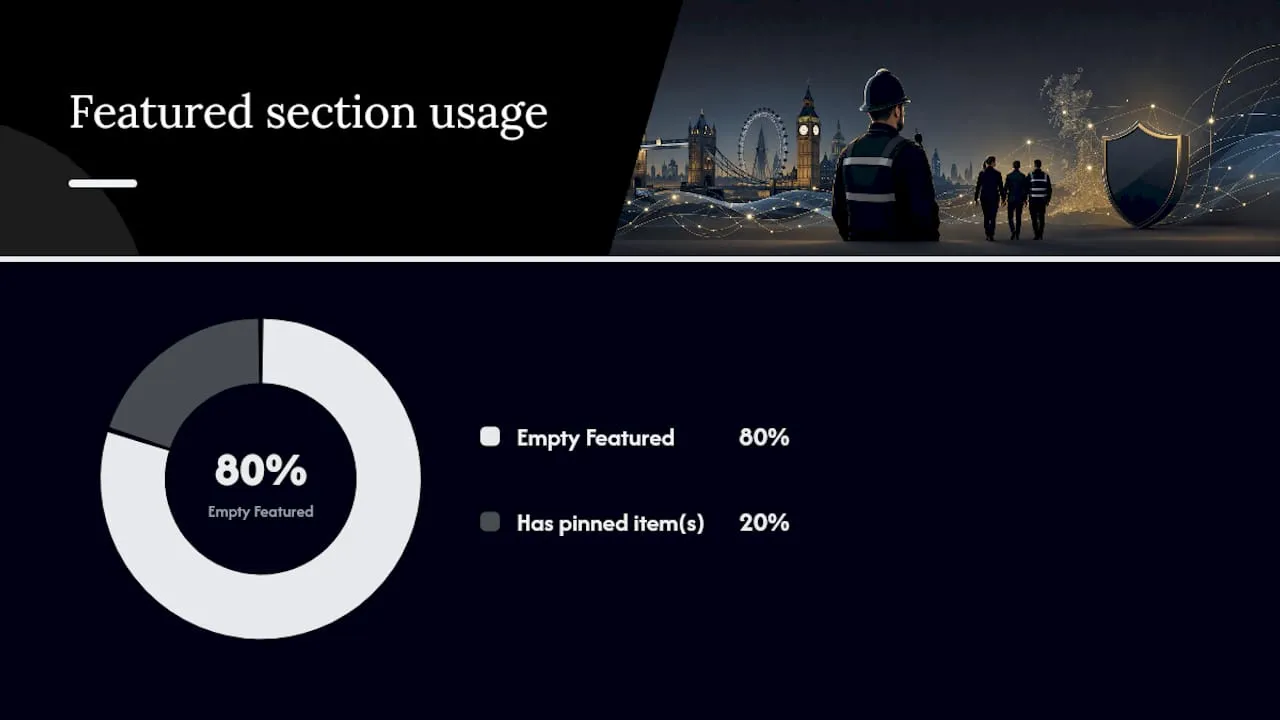
Around 80% of LinkedIn profiles leave the Featured section completely empty, according to profile optimisation guidance for UK jobseekers, which means pinning even one relevant item puts you ahead of most people a recruiter scans that day.
Building a posting routine that actually sticks
You don’t need to post daily. A steady rhythm beats an occasional burst, and it’s far easier to sustain alongside interviews, applications and, often, a current job.
- Cadence: two to three substantive posts a week, rotating between an insight, a proof point, and a direct ask.
- Timing: weekday mornings and early afternoons tend to reach professional audiences best; test one posting window for a full month before switching it.
- Hashtags: stick to two or three, mixing a function tag, an industry tag, and #OpenToWork where it fits.
- Engagement: reply to every comment within the first hour, then follow up promising contacts with a short, specific direct message.
- Measurement: track comments, direct messages from recruiters, and any interview requests that follow, rather than watching the like count.
Static profiles with occasional bursts of activity tend to underperform compared with smaller, consistent updates paired with regular engagement. LinkedIn’s algorithm rewards accounts that show up reliably, not ones that go quiet for three weeks and then post once, loudly.
Mistakes that quietly sabotage your job search posts
Small errors here cost you far more reach than they should.
- Being vague. “Open to anything” tells a recruiter nothing they can act on. Name the role, level, and location.
- Leading with emotion, not evidence. A difficult redundancy story might get sympathy likes, but it rarely gets a message from a hiring manager. Lead with proof, and let context follow if needed.
- Using the public badge when you need discretion. The green Open to Work badge is visible to everyone, including your current employer, so switch to recruiter-only if that’s a risk.
- Ignoring comments. Engagement is what drives distribution; a post nobody replies to gets buried fast.
- Overloading tags and hashtags. More than three hashtags or several unrelated tags reads as spam and can actually suppress reach.
Turning LinkedIn interest into applications on a niche board
LinkedIn is where recruiters find you. A specialist board is where that interest turns into an actual application they can track. Niche platforms capture roles that never get widely advertised elsewhere and let you upload a CV once, set alerts, and get matched faster to sector-specific vacancies.
Security Jobs Board is built specifically for the UK security sector, with GDPR-compliant handling of candidate data, a mobile-responsive site for applying on the move, and a listed BSIA affiliation that adds a layer of credibility for both jobseekers and employers.
- Pin a link to your board profile or CV in your LinkedIn Featured section so recruiters clicking through have somewhere concrete to land.
- Set job alerts for your target role and location so new security vacancies reach you without daily searching.
- When a recruiter messages you from a LinkedIn post, point them to your board application so the conversation has a tracked, formal next step rather than staying in someone’s inbox.
Learning how to use a niche job board effectively alongside your LinkedIn activity means every post you write has somewhere useful to send interested recruiters.
How to tailor posts for different industries or roles
A frontline security officer and a security operations manager should not be posting the same content, even if they’re both job hunting in the same sector. The proof points that matter differ, and so does the audience reading them.
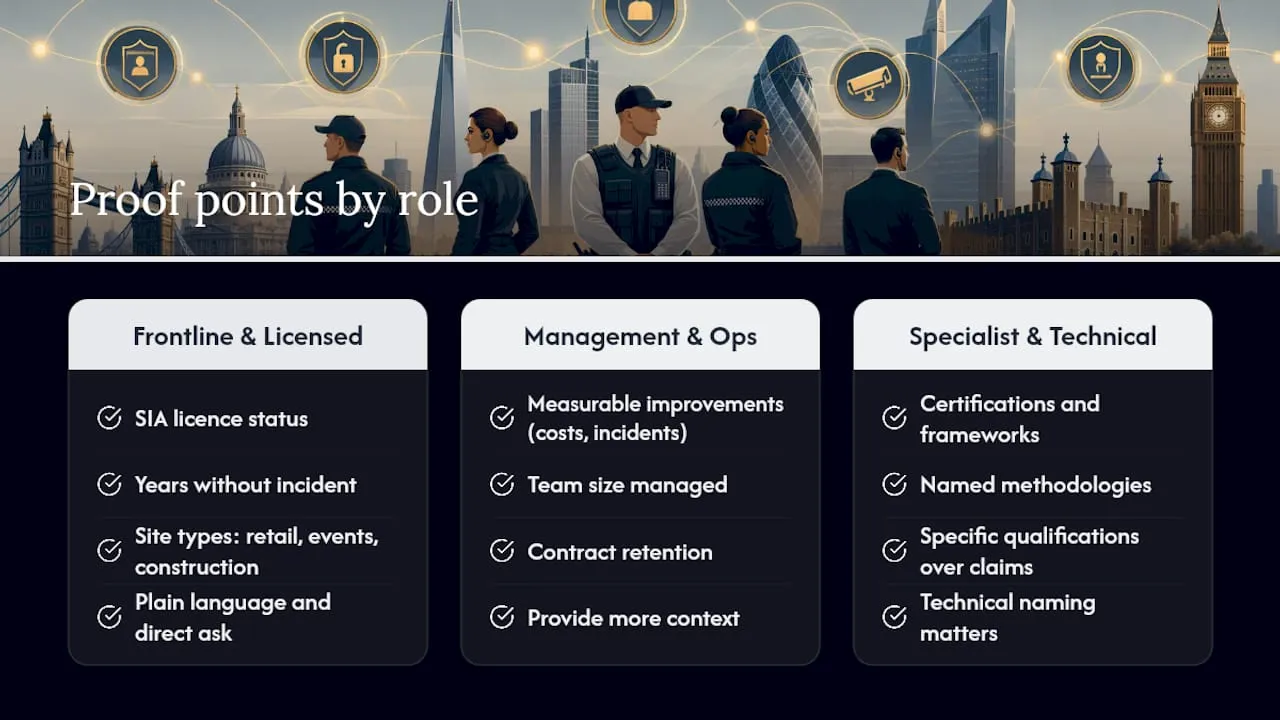
For frontline and licensed roles, such as door supervisors, mobile patrol officers, or CCTV operators, proof points centre on reliability and compliance: SIA licence status, years without incident, specific site types covered (retail, events, construction). Keep the language plain and the ask direct, since the recruiters sourcing these roles are often moving quickly through high volumes of candidates.
For management and operations roles, proof points shift towards measurable improvements: cost savings, incident reduction, team size managed, contract retention. These posts can afford slightly more context because the hiring decision involves more scrutiny.
For specialist or technical security roles, such as cyber security or risk consultancy, certifications and named methodologies carry more weight than general experience. Naming a specific framework or qualification you’ve completed does more work than a general claim of competence.
Across all three, the same rule holds: match your hashtags to the sub sector, not just “security” broadly. #DoorSupervisor, #SecurityOperations, and #RiskManagement each reach a different pocket of your target audience, and mixing generic tags with specific ones widens your reach without diluting relevance.
Leveraging LinkedIn groups and tagging to expand reach
Groups are one of the most underused tools on LinkedIn for jobseekers, largely because they’ve fallen out of fashion compared with the main feed. That’s precisely why they’re still useful: less competition for attention inside a smaller, more relevant audience.
Search for groups specific to UK security, facilities management, or risk and compliance, and post your proof-led updates there as well as on your main feed. Group members are often industry insiders, hiring managers, or fellow professionals who share vacancies before they’re advertised elsewhere.
Tagging works the same way, used sparingly. Tag a former manager who can vouch for a specific result you mention, or a company page if you’re referencing a project you completed with them, but only when it’s directly relevant to the post. Tagging five people hoping one of them shares your post rarely works, and it often reads as an attempt to force visibility rather than share something genuinely useful.
A better approach: comment thoughtfully on posts from recruiters or hiring managers in your target sector before you ever post your own announcement. This builds familiarity, so when your own post appears in their feed, your name is already recognisable.
Examples of successful job search posts
The pattern behind posts that actually generate replies is consistent: a specific hook, one piece of evidence, and a low-friction ask.
One example: “18 months managing security for a 12-site retail portfolio. Zero missed patrols, one promoted assistant supervisor under my mentoring. Looking for my next role as a Security Operations Manager, ideally based in Birmingham. If you’re hiring, or know someone who is, a comment or DM would mean a lot.”
Another, shorter and more direct: “SIA licensed, five years’ door supervision experience, no incidents on record. Actively looking for full-time work in Greater Manchester. Open to hearing from anyone hiring. #DoorSupervisor #OpenToWork”
What both share: the role is named, the location is named, one number backs up the claim, and the ask is a single clear action rather than an open-ended plea. Neither post is long. Neither leans on emotional appeal. Both give a recruiter something they could screenshot and send to a hiring manager without editing.
How to monitor and analyse post performance
LinkedIn gives you basic analytics on every post: views, reactions, comments, and shares. For a jobseeker, the numbers that matter most aren’t the vanity metrics but what happens after the post.
Track three things weekly: the number of substantive comments (not just emoji reactions), the number of direct messages from recruiters or hiring contacts, and any interview requests that trace back to a specific post. If one format, say the proof-led post, consistently generates more messages than the announcement format, shift your rotation to lean into what’s working.
Check which day and time each post went out. Over a month of consistent posting, patterns usually emerge showing when your specific network is most active, which is more reliable than following generic advice about “best time to post”.
Also worth watching: which hashtags appear on the posts that get the most recruiter engagement, versus the ones that only attract likes from your existing connections. That distinction alone tells you whether your content is reaching new people or just circulating among people who already know you.
A note on staying consistent when nothing feels like it’s working
Job search posting rewards patience more than cleverness. Most people give up after two or three posts because the silence feels like proof it isn’t working, when actually it usually just means the algorithm and the right recruiter haven’t crossed paths yet.
Treat each post as a small experiment rather than a single shot at success. Notice which format gets replies, drop what doesn’t, and keep the ones that do in rotation. Every post should link back, even loosely, to something concrete in your Featured section or Experience entries, so a recruiter clicking through always finds evidence waiting for them.
— Rob
Use Security Jobs Board alongside your LinkedIn activity
Security Jobs Board is the direct route into UK security vacancies that LinkedIn simply isn’t built for. Where LinkedIn puts you in front of a general professional network, Security Jobs Board puts you in front of employers actively hiring for security-specific roles, with CV upload, job alerts, and a listing base focused entirely on the sector.

Once your LinkedIn post is live, pin a link to your Security Jobs Board profile or CV in your Featured section, so anyone who comments or messages has somewhere concrete to send you towards an actual application. Set up job alerts for your target role and region so relevant vacancies reach you automatically instead of relying on catching the right LinkedIn post at the right moment. If you’re based in or open to relocating to Northern Ireland, browse current security jobs in Northern Ireland and apply directly through the platform. Candidates use the service free of charge, and every application is handled with GDPR compliance and human support.
Sources
- How to Update Your LinkedIn Profile UK 2026 — Step-by-step
- LinkedIn post for job seekers: Guide 2026
- Stay discoverable: how to keep your job search moving
FAQ
How do I post on LinkedIn that I’m looking for a job?
Name the exact role, location and work type you want, include one proof point such as a result or project, and end with a low-friction ask like a comment or DM. Turn on Open to Work in recruiter-only mode if you want to stay discreet from your current employer.
What is the 3/2/1 rule on LinkedIn?
It refers to a simple posting rotation: roughly three insight or value posts, two proof or achievement posts, and one direct ask, spread across your weekly content mix. The exact ratio varies by guide, but the principle behind it, rotating formats rather than repeating the same post type, holds consistently.
How do I professionally say I’m looking for a job?
State it plainly and specifically: name your role, your location, and one concrete achievement, then ask for a comment, share or introduction. Avoid vague phrasing like “open to anything” since it gives recruiters nothing searchable to act on.
How do you announce you’re looking for work on LinkedIn?
Write a short post with your target role and location up front, one proof point in the second line, and a clear call to action at the end. Add two or three relevant hashtags and route interested contacts towards a tracked application, on a specialist board like Security Jobs Board for security roles, rather than leaving the conversation in your inbox.


